Upgrading a Proxmox Node and Storage With Minimal Downtime

I spent years on Kubernetes: Amazon EKS clusters at work, Kubespray clusters at home, Helm charts, ArgoCD, service meshes, you name it. I loved it. I also spent years fighting it. CNIs that lost their mind for no reason, storage claims that wouldn't release, ArgoCD projects that refused to sync for one reason or another. I hated it.
I found Proxmox at a time when I was investigating things like Hashicorp Consul and Docker Swarm for some simple remote container execution I needed. I forget the project, but I came across a package for it on Proxmox VE Scripts and was intrigued enough to launch PVE on a single node server.
I was hooked. Instead of choosing between a simple but local-bound Docker Compose file and having to manage a quorum of remote API servers, I found I could install PVE and have a managed control plane for free. Containers come up on the network, grab a DHCP address, and serve traffic. No YAML sprawl. No ingresses to manage.
How It Started
My Proxmox cluster consists of 3-5 nodes that come into and out of service as I buy new machines and rotate old ones out. Buy a new gaming machine? It goes in the cluster and gets a gaming VM with GPU passthrough. Need more space for family photos? Buy a big drive, add it to a node, and run MinIO or TrueNAS on it.
My PVE journey started on a single node that attempted to do all of these: gaming, family storage, networking lab. And it lasted for seven years before the SMART errors started showing up. Seven years of VMs, containers, and backups, all on one drive. This spring I decided to do some housekeeping.
I wanted three things: get my critical workloads off that disk, move to ZFS, and separate my failure domains so a dead drive couldn't take both VMs and backups at once. The catch, as usual, was doing it with minimal downtime.
The Old Topology
pve1 had a simple layout. The initial 4TB HDD served as both boot drive and primary storage. A 500GB NVMe was added later that held a few VMs that needed faster I/O, everything using LVM with thin provisioning by default. That caused some problems, as I really wanted that faster NVMe SSD for my boot drive instead of the slower HDD.
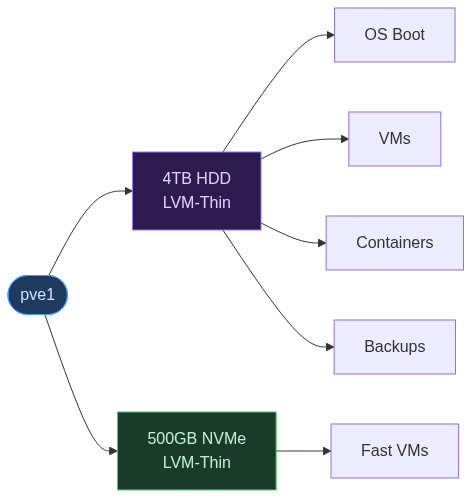
I should mention that one of my goals for my homelab is to force myself to use off-the-shelf, commonly used components. Could I just buy a bigger computer and migrate everything? Sure. Do I want to pull out my credit card every time there's a problem? Hell no. Sometimes disk space gets tight, but I like a challenge.
In this instance, since SMART errors were already flagged, a new drive was definitely called for. But because the server had some history, I needed some way to figure out how to get the boot drive from the old failing 4TB to the NVMe drive already in use, and I needed a new drive to take over the non-boot, data volumes.
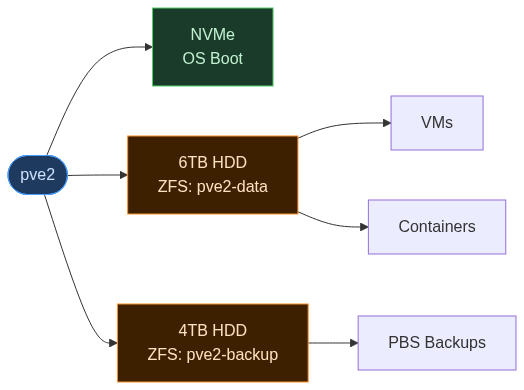
The goal was a clean topology: NVMe for the OS, a new 6TB HDD for VM data on ZFS, and the old 4TB repurposed as a backup drive. I run Proxmox Backup Server, as well, and I have no problem with running this drive into the ground for backups until it dies.
Moving to ZFS
First, a word on storage. As a long-time Linux user, I've used the Linux Volume Manager since forever. When installing Proxmox for the first time on this node, it was presented as the default and felt like a familiar, no-brainer. That said, I've also used XFS (IRIX, we hardly knew ye!) and was intrigued by Proxmox's ZFS option.
This time around, I wanted to try the non-default and decided to create ZFS pools to take advantage of some of its more advanced features: checksumming, software RAID, snapshots, compression, and caching. So, I installed a 6TB drive and created a ZFS pool:
zpool create -o ashift=12 pve2-data /dev/sdb
Then I moved every VM and container to the new pool. VMs were straightforward. Proxmox lets you migrate disks online:
for vmid in 100 101 102 ...; do
    qm move-disk $vmid scsi0 pve2-data
done
The VM keeps running. The disk copies in the background. When it finishes, Proxmox swaps the config pointer and discards the old disk.
Containers are different. pct move-volume requires the container to be stopped. I shut each one down, moved it, and brought it back up. A few seconds of downtime per container. Just don't run too many moves at once. You can easily swamp I/O and cause heartbeat timeouts, which will take the node offline until the I/O settles.
The Reinstall Trick
With all data on the ZFS pool, the NVMe and the old 4TB were empty. I could have wiped the NVMe and reinstalled Proxmox in place, but that meant tearing down the running node.
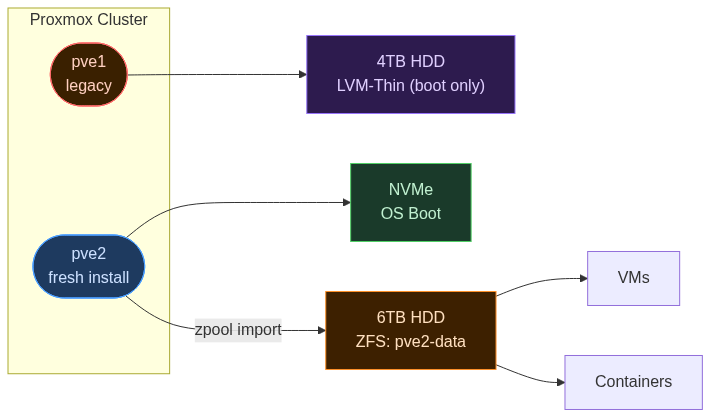
Instead, I reinstalled Proxmox on the NVMe as a new node, pve2, while pve1 kept running on the old disk. If anything went wrong, I could boot back into pve1 and nothing would have changed.
After the fresh install, I joined pve2 to the cluster:
pvecm add <existing-node-ip>
Then imported the ZFS pool:
zpool import pve2-data
That's it. ZFS pools are self-describing. Plug the disk into a different machine, run zpool import, and everything appears exactly as you left it.
The Config Handoff
The VMs and containers were on the ZFS pool, but Proxmox didn't know about them. Their configs still lived under /etc/pve/nodes/pve1/.
Proxmox uses pmxcfs, a cluster-wide filesystem that all nodes share. Moving configs between nodes was a simple filesystem operation:
mv /etc/pve/nodes/pve1/qemu-server/* /etc/pve/nodes/pve2/qemu-server/
mv /etc/pve/nodes/pve1/lxc/* /etc/pve/nodes/pve2/lxc/
I added the ZFS pool as a storage entry in the Proxmox UI, started everything up, and it all came back clean. Once pve2 was stable, I removed pve1 from the cluster:
pvecm delnode pve1
The whole migration took about twenty minutes. Most of that was the installer. To recap:
- Fresh install on the NVMe
- Joined pve2 to the cluster
zpool importon the 6TB- Config files moved in pmxcfs
- VMs started on pve2
- Removed pve1 from the cluster
The Backup Pool
Now the old 4TB was free. I wiped it and created a second ZFS pool:
zpool create -o ashift=12 pve2-backup /dev/sdc
This became the Proxmox Backup Server datastore I mentioned earlier, the one I'm happy to run into the ground. It holds nothing but backups. If the 6TB data drive dies, the backups survive. If the 4TB backup drive dies, the VMs keep running. Those are the independent failure domains I was after.
ZFS is a natural fit for backup storage, too. Scrubs catch bit rot before it touches the archives. Snapshots are cheap. And if I ever swap the drive into another machine, zpool import works the same way it did here.
How It Went
This cluster node has been running on the new disk layout for a few months. It's not exciting, but it works, and pve2 carries about a third of my home compute (on a 10-year-old machine) with newfound room to grow. That's a clear win in my book.
I still love Kubernetes for containers: it's what it was built for. The "ocean of YAML" that pushed me toward Proxmox community scripts is also a lot more approachable now with agents in the loop. But handling physical storage is where Proxmox gives me both reliability and flexibility.
In fact, with storage being a "solved problem", I may dive deeper in future posts into running Kubernetes on top of Proxmox, which is where that gets interesting: immutable, API-driven Kubernetes nodes on a bare-metal hypervisor you manage from a browser.