Building a Local LLM Playground with Ollama on Proxmox - Part 2

So, you followed along with Part 1, got Proxmox humming on your workstation, and now you're staring at a beautifully virtualized Windows VM happily running Ollama with your GPU passed through. What now?
If you're anything like me, "what now" quickly turns into a rabbit hole. You want a decent UI to talk to your models. You want your IDE to connect remotely so your MacBook isn't doing the heavy lifting. And sooner or later, you find yourself thinking: what if I need a 32GB GPU and I definitely don't have the budget for one?
This post picks up where we left off, walking through the supporting services I've layered around the GPU: the pieces that turn a neat virtualization trick into something you'd actually want to use every day.
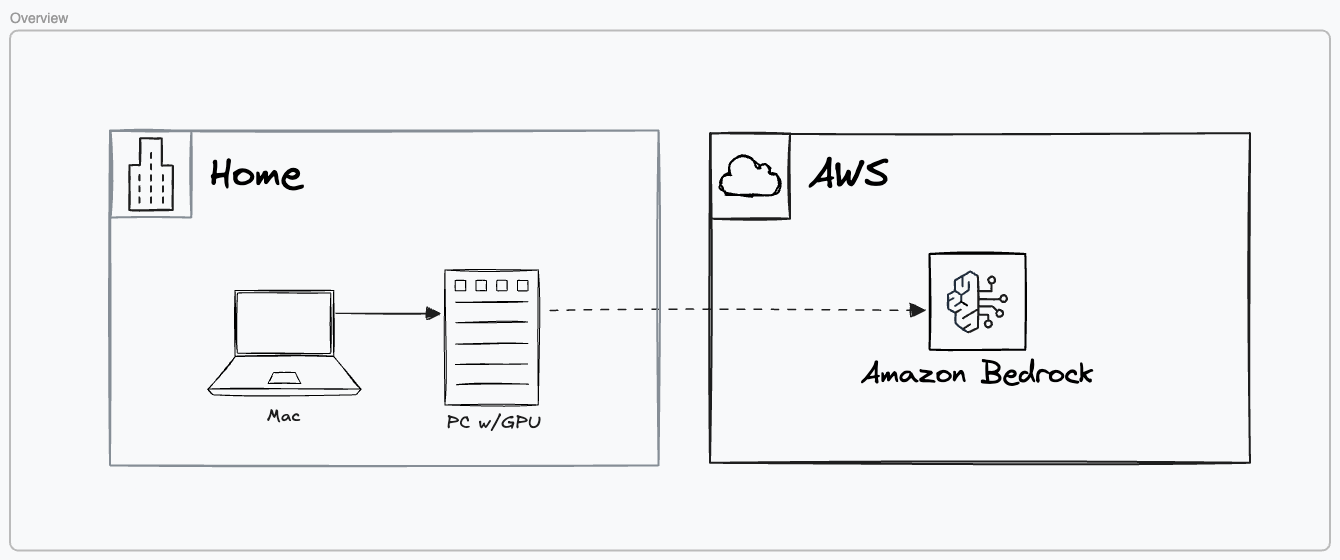
The Setup, Fully Fleshed Out
At its core, the environment is still a single Linux server on bare metal running Proxmox, with my MacBook as the roaming client. The server is wired in, backed by a UPS, and stays on. The MacBook is where I live. Compute stays home, interface travels with me. That separation is what makes this whole thing worth the trouble.
Here's what's running on top of Proxmox now:
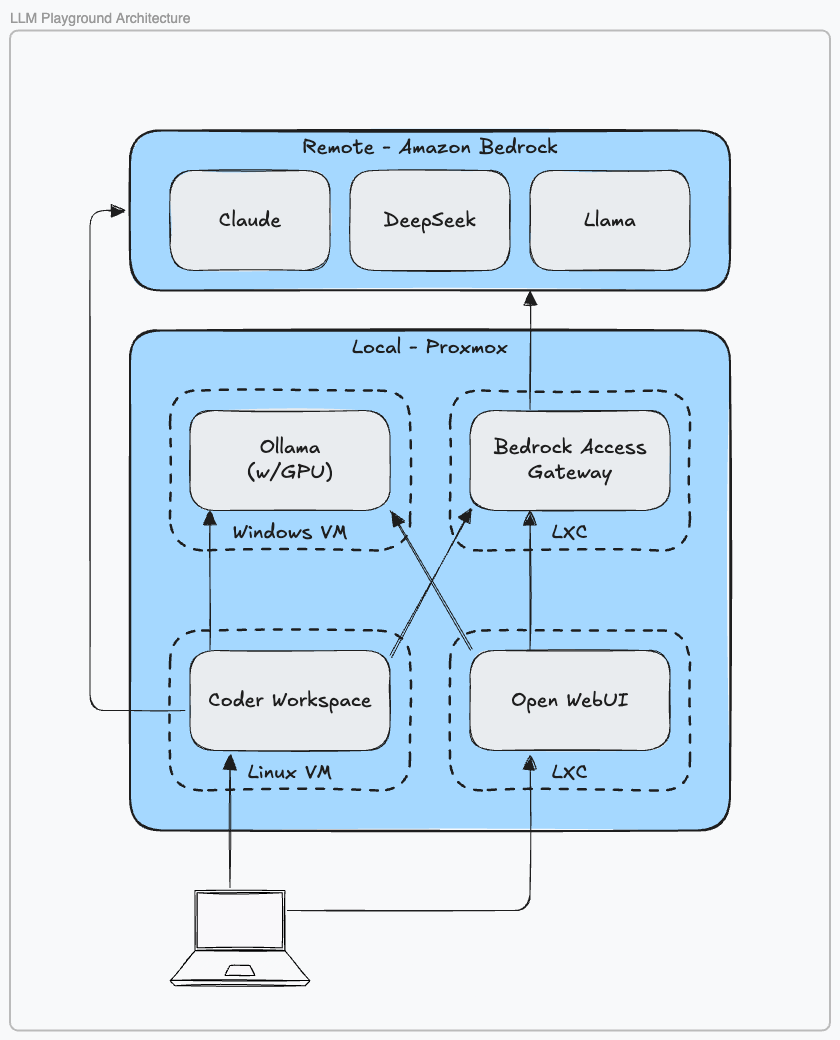
The Windows VM hosts Ollama, serving OpenAI-compatible endpoints so anything that speaks to GPT can just as easily speak to Llama, Gemma, or whatever model I've pulled down that week. It has the GPU, so it handles inference. Everything else steers clear.
The Linux VM runs Coder, which is the piece I didn't know I needed until I had it. Coder spins up Docker-based dev environments on demand. VS Code, Cursor, Windsurf — pick one. When I open my MacBook in the morning, I'm connecting to a workspace that lives entirely on the server: reproducible, isolated, and reachable from wherever I happen to be. Coder also handles ad-hoc port forwarding when I need to expose something locally for testing.
Then there are two LXC containers doing quieter but important work. One runs Open WebUI, which gives me a browser-based front end for talking to models directly, good for evaluation, prompt experimentation, and sharing access with others via role-based auth (it even supports LDAP if you're into that kind of thing). The other runs Bedrock Access Gateway, which I'll get to in a moment.
A Day in the Workflow
A typical session looks something like this: open the MacBook, connect to my Coder instance, select a workspace, and Coder spins it up with docker run. I launch Windsurf and start coding in a remote IDE that's actually running on the server. Open WebUI sits in a browser tab for when I want to think out loud with a model. Git pushes go to an internal repo on the Proxmox host.
There's a lot happening, but none of it feels complex anymore. It just runs.
Beyond the Homelab

No matter how good your local hardware is, there will come a moment when you want a model that simply won't fit in VRAM. Llama 3.2 at 8B is quick and capable, but sometimes you need something beefier, and buying a 32GB GPU for occasional use is hard to justify.
That's where the Bedrock Access Gateway earns its spot. With an AWS account and a single IAM role, you can supplement your local models with Amazon Bedrock's full catalog, accessible through the same OpenAI-compatible interface your local models already use. Open WebUI doesn't know the difference. Neither does your IDE. You just switch the endpoint.
The performance difference is stark, too. Local inference with Llama 3.2 can take several seconds per response. AWS Nova Lite often starts responding in under a second, with dozens of other models available on demand. Alternatives like LiteLLM or OpenRouter offer similar reach, but I'd rather keep traffic inside a trusted perimeter (either the home lab network or a dedicated AWS VPC) than route it through a third party I don't control.
Word to the wise when working with AWS services: hold on to your wallet and set sensible limits. Bedrock charges by the token, and they add up fast.
Why Not Just Use Docker Compose?
Fair question. I asked myself the same thing, more than once.
I started with Kubernetes: full Kubespray, ArgoCD, Helm, the works. It was great until it wasn't. When Kubernetes breaks, it breaks spectacularly. I spent more time nursing a broken cluster back to health than I did actually building anything. (I did get very good at SRE. Whether that's a silver lining or a sunk cost, I leave as an exercise for the recruiter – er, reader.)
The fallback was Docker Compose on my MacBook, which worked fine until it didn't: amd64 images that wouldn't run on Apple silicon, networking headaches with DNS and port forwarding, and no clean path to adding compute without jumping back into the Kubernetes deep end. Proxmox ended up striking the balance: easier to operate than Kubernetes, more flexible and reliable than Docker on macOS.
Why Not Just Use ChatGPT?
Cost is part of it. Owning the hardware provides some insulation against subscription creep. But the bigger reasons are security, governance, and flexibility.
Handing sensitive data to a third-party API is a real trade-off. OpenAI is excellent for OpenAI models, but the moment you want to evaluate multiple vendors, swap models with minimal friction, or keep your data out of someone else's training pipeline, you need to own the architecture. The learning experience is its own reward. Or so I tell myself at 11pm on a Tuesday.
Keeping It Accessible
One thing that surprised me about this setup is how little networking complexity it actually requires. Because Coder runs as a VM alongside everything else, it acts as a single ingress point to the environment: one open port on the firewall, one entry point for remote access.
For working away from home, I run pfSense with the Tailscale package, which turns the server into a WireGuard VPN exit node. With subnet routing enabled, I can connect from a coffee shop and work exactly as if I were sitting next to the machine. It's one of those configurations that sounds complicated and then, once it's set up, you forget it's even there.
What's Next
We've covered the supporting cast: Open WebUI for model interaction, Bedrock Access Gateway for cloud augmentation, Coder for remote development, and Tailscale for connectivity from anywhere. The core is solid. In upcoming posts, I plan to dig more into Coder and the tools around it, including evaluation platforms so you can measure your prompt effectiveness.
Until then, keep building. The breaking is part of it.